How to Sell or Auction Your Domain Through QuickServers
Selling a domain name can be a great way to get value from unused assets, rebrand smoothly, or make money from a high-demand domain.
Whether you want to sell directly to a buyer or list your domain for auction, QuickServers gives you the tools to prepare your domain, manage settings, and complete the transfer process safely.
This step-by-step guide explains what you need to do before selling, how to prepare your domain inside the QuickServers customer portal, and what to expect during a sale or auction.
1. Make Sure Your Domain Is Ready to Sell
Before you list or sell a domain, check the following:
-
The domain is active and not expired
-
Domain ownership contact details are correct
-
Domain locking is turned off only when you’re ready to transfer
-
The domain has no legal or trademark issues
-
You have access to your QuickServers customer portal
Preparing your domain ensures a smooth transfer for both you and the buyer.
2. Sign in to the QuickServers Customer Portal
To start managing your domain for sale:
-
Go to the QuickServers website
-
Log in using your customer portal credentials
-
Click on the Domains tab in the main dashboard
This displays all domains currently in your QuickServers account.
3. Choose the Domain You Want to Sell
From the list of domains:
-
Click on the domain name you want to sell
-
This takes you to the domain management page
Here, you can update ownership information, check DNS settings, and prepare the domain for a future transfer.
4. Review and Update Domain Ownership Information
Buyers will need accurate WHOIS details to validate ownership.
Make sure:
-
The registrant name is correct
-
Your administrative contact email is active
-
You can receive approval or transfer emails
-
No outdated or incorrect information is listed
Keeping ownership information accurate helps avoid delays.
5. Unlock the Domain Before Transfer
Most transfers require the domain to be unlocked:
-
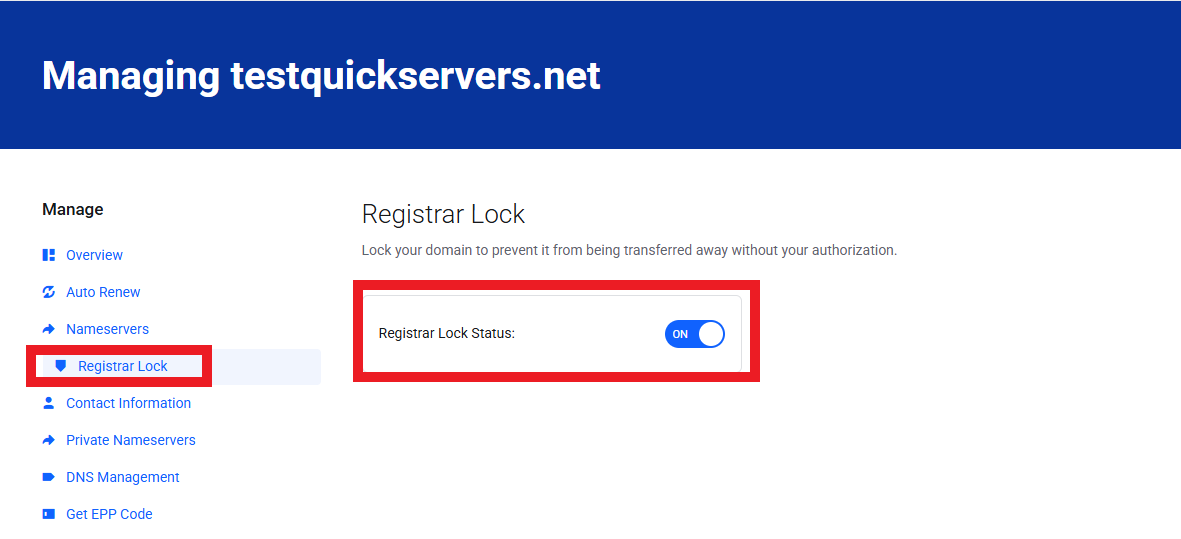
Go to the Registrar Lock section
-
Switch the setting from Locked to Unlocked
-
Save your changes
Only unlock when you have an active buyer or listing to prevent unauthorized transfers.
6. Get Your Authorization Code (EPP Code)
Buyers need your domain’s authorization code to complete the transfer.
Find your EPP/Auth code by:
-
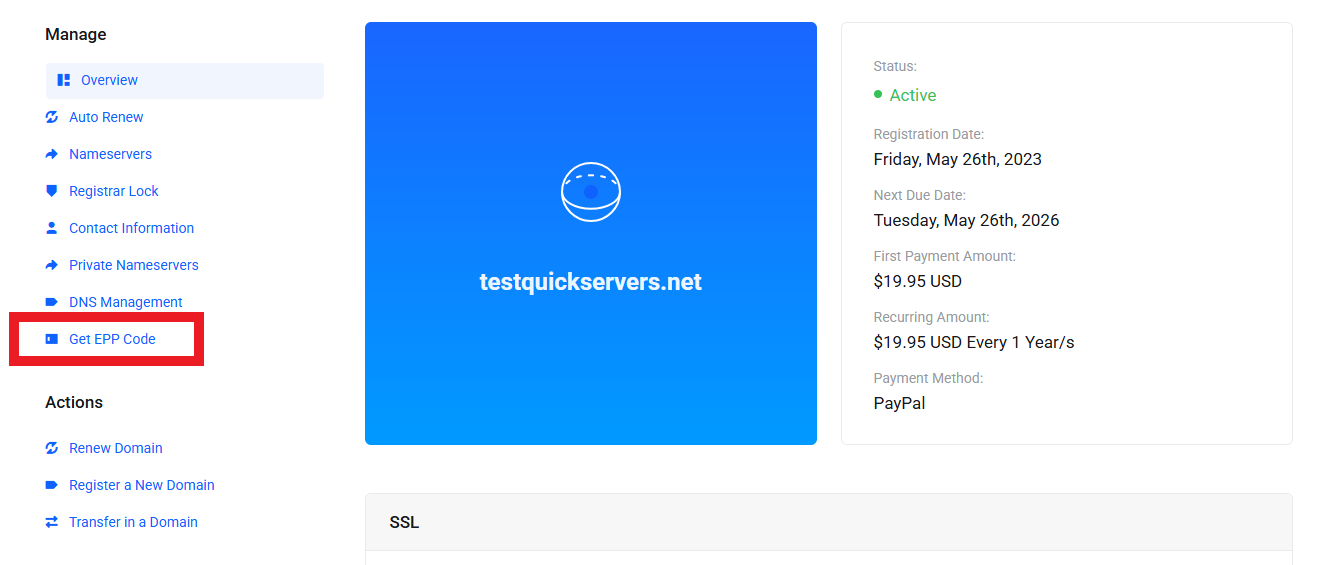
Opening your domain management page
-
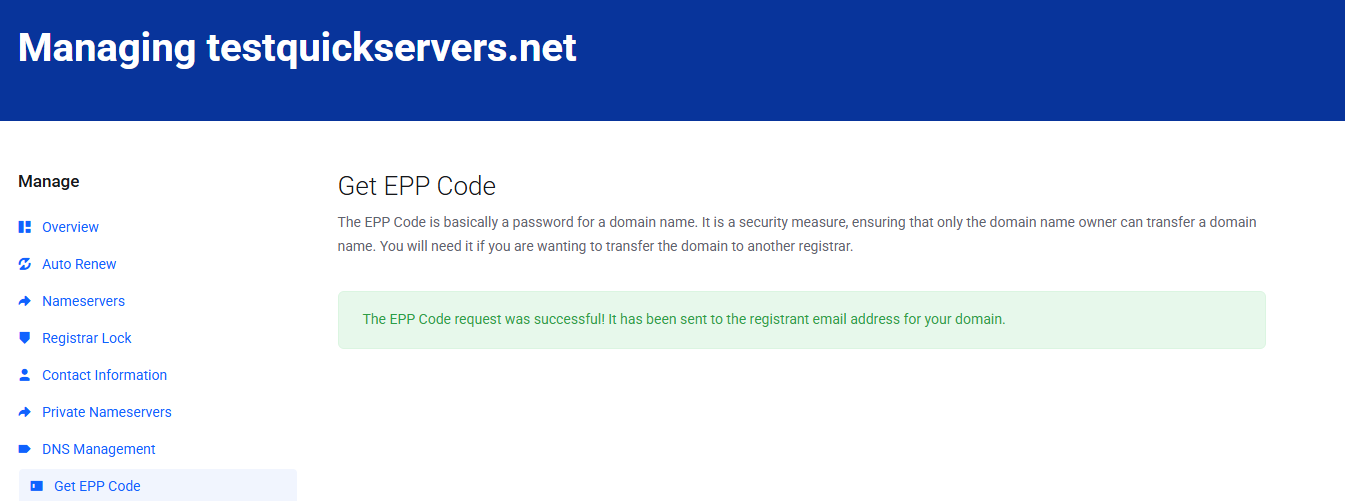
Selecting Get EPP Code
Copy this code and keep it securely until the buyer requests it.
8. Decide How You Want to Sell Your Domain
You can sell a domain in two main ways:
-
Direct sale – You negotiate privately and transfer the domain once payment is complete
-
Auction listing – List your domain on a marketplace and let buyers bid
Choose the method that best fits your goals.
Direct sales are faster and simpler.
Auctions may get higher prices for premium domains.
9. Add a Temporary Redirect or Landing Page (Optional)
To attract potential buyers, you can set your domain to:
-
Redirect to a “For Sale” page
-
Display a simple landing page with contact information
This is optional but can help marketing efforts.
To set a redirect:
-
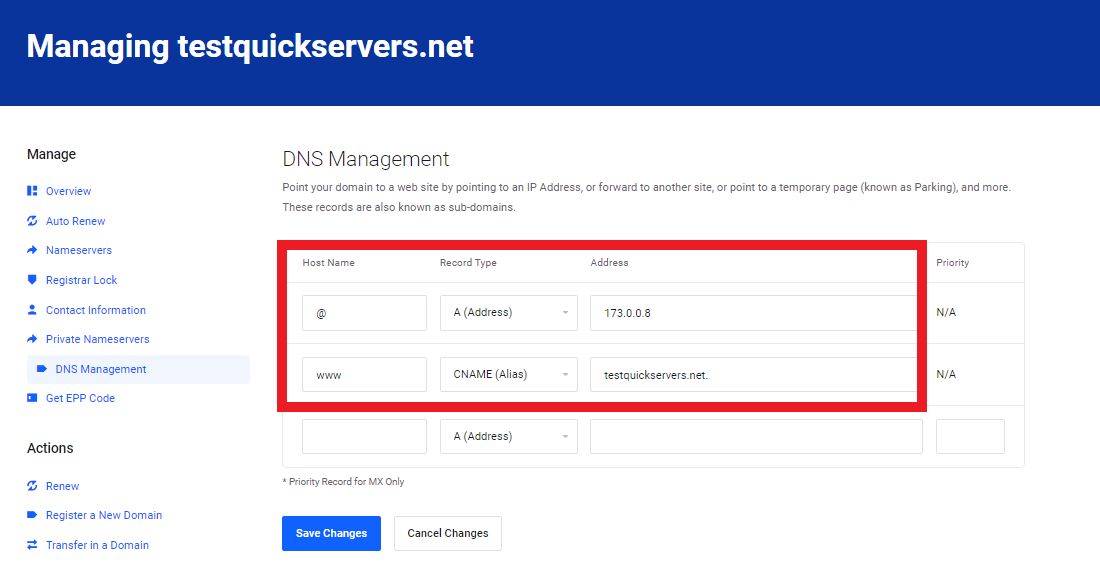
Go to DNS Management
-
Add a redirect record or update A/CNAME settings
-
Save your changes
-
Complete the Transfer to the New Owner
10. Once you agree on a sale:
-
Share the EPP/Auth code with the buyer
-
Make sure the domain is unlocked
-
Approve any transfer emails sent to your administrative contact
-
Wait for the buyer’s registrar to complete the move
Domain transfers typically take 24–72 hours, though some may take up to 5–7 days depending on the extension.
11. Confirm Transfer Completion
After the domain leaves your QuickServers account:
-
You will receive a confirmation email
-
The domain will no longer appear under My Domains
-
Billing and auto-renew settings will automatically stop
-
You should record the transfer for your personal or business records
Once the transfer is confirmed, your sale is complete.
12. Tips for a Safe and Smooth Domain Sale
To avoid issues when selling a domain:
-
Always receive payment before giving out the EPP code
-
Use trusted marketplaces for auctions
-
Keep your WHOIS admin email active
-
Unlock your domain only during the transfer window
-
Turn privacy off only when necessary for verification
-
Avoid changing DNS during the sale unless requested by the buyer
Following these steps protects both you and the buyer during the process.
The Bottom Line
Selling or auctioning a domain through QuickServers is a straightforward process when you prepare properly.
By checking ownership information, unlocking your domain, retrieving your EPP code, and choosing the right selling method, you can transfer your domain smoothly and securely.
QuickServers gives you the tools and control you need to manage your domain assets confidently—whether you’re selling a single domain or an entire portfolio.